


About
Workflow & Citrix manipulation
This part of the RPA tutorial will help you learn workflow and Citrix manipulation, how to invoke a workflow, what is data manipulation, understanding Citrix automation, PDF automation among other things.
Learn More
How to Invoke a Workflow?
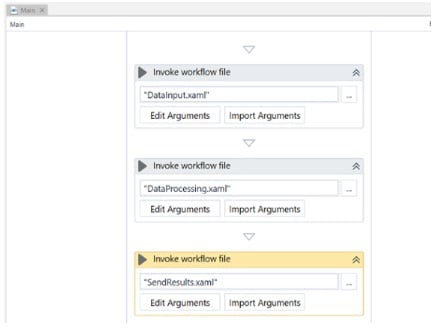
What is a Workflow? As we already saw, a workflow is a set of an individual process executed in UiPath for automating the activities. Why we need Workflows? When we are developing a large process, it is difficult to follow and test the process from top to bottom. So it is recommended to split into small processes, test them and invoke each process in the Main workflow. We can pass arguments from one workflow to another. You can simply add UiPath.Core.Activities.Invoke Workflow File or click add an Invoke WorkFlow activity in the first workflow.
We can pass three different parameter types as an argument –
- IN – Arguments passed in, not returned.
- OUT – NULL value, is not of significant importance
- IN/OUT – This indicates meaningful values on input & output values
Data manipulation:
Data of different sorts can be put in variables, and there are a few variables composes you can work within UiPath Studio. They can be of 3 types:
- Scalar – Characters, Booleans or Numbers
- Collections – Arrays, Lists, Strings – are a gathering of characters, and Dictionaries, which are utilized while separating information from Orchestrator queues.
- Tables – are two-dimensional structures that hold information separated by rows & columns.
UiPath Studio additionally includes a one of a kind sort of factor, the GenericValue variable, which is intended to make using of the fundamental activities simple. This variable type can interact to essential kinds of data, including content, numbers and date/times.
Citrix Automation:
The tools and methods used in Citrix are for virtual machines, therefore UiPath cannot interpret it directly. We need to teach the robot to form filling, screen scraping, etc. A virtual machine is a kind of like an emulation of the computer system. The Citrix recording wizard is an important tool used in automation. We can perform the same mouse clicks, keyboard shortcuts, screen scraping, insert data, retrieve data, etc.. on the virtual environment like how we performed on desktop and web recording.
PDF Automation:
We need to ensure the PDF activities pack is present in the UiPath studio. Read PDF Text activity is used to extract the text from PDF on the selected region. For images, we can use Read PDF with OCR. Its output is a string only. We can also use the regular screen scraping too for this purpose. Using Anchor base activity we can extract fluctuating values from several pdf files.
Wish to crack RPA Courses – Intellipaat’s Top RPA Courses in Omni Academy are meant only for you!
Related Courses – Learn Online Now
Robotic Process Automation (RPA) UiPath
Machine Learning with 9 Practical Applications
Data Sciences with Python Machine Learning
Data Sciences Specialization
Diploma in Big Data Analytics
Mastering Python – Machine Learning
Learn Internet of Things (IoT) Programming
Oracle BI – Create Analyses and Dashboards
Microsoft Power BI with Advance Excel


Leave a Reply